In Zerodha kite api how to place SL Buy Order with StopLoss and Target Levels (GTT) defined?

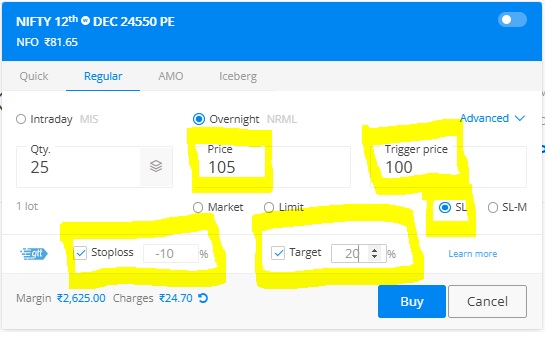
In Zerodha Kite api how can I place SL Buy Order with Stop Loss and Target Levels for GTT orders defined ? This same thing can be done in their front end website so I am trying to put the same order through python api. Please note that I am easily able to place “SL Buy Orders” with Zerodha kite api but I am not able to place “SL Buy Orders with Stop Loss and Target Levels (for GTT orders) defined”.

I am attaching print-screen from the Zerodha Website to explain which type of order I want to place through python api code.

My Code as below

optionName = “NIFTY24D1224500PE”
lot_size= 25
no_of_lots=1
meta = {‘gttp’:[[1,-12],[1,25]]}

order_id = kite.place_order(variety = kite.VARIETY_REGULAR, exchange = kite.EXCHANGE_NFO, tradingsymbol = optionName ,
transaction_type = kite.TRANSACTION_TYPE_BUY, quantity = lot_size * no_of_lots , product = kite.PRODUCT_NRML,
order_type = kite.ORDER_TYPE_SL, price=97.0, validity=kite.VALIDITY_DAY, disclosed_quantity=None,
trigger_price=90.0, squareoff=None, stoploss=None, trailing_stoploss=None, tag=None, meta=meta)

Is giving Error as below,

TypeError: place_order() got an unexpected keyword argument ‘meta’
Query_to_TradeHull_forum

@Maulik

The error you’re encountering, TypeError: place_order() got an unexpected keyword argument 'meta', is due to the fact that the meta parameter is not supported in the place_order() function of the Zerodha Kite Connect API. The place_order() function is only used for placing individual orders, and it does not handle additional settings like GTT (Good Till Trigger) for stop loss and target in one step.

In your case, if you want to place an SL Buy order with both Stop Loss and Target levels.

1. Place the SL Buy Order

This step remains the same as before. Place an SL order using the kite.place_order() function without the unsupported meta parameter.

2. Check Order Execution

Wait for the SL Buy order to be executed before proceeding with the GTT orders for stop loss and target. You can check the order status using the kite.orders() function.

3. Place GTT Orders for Stop Loss and Target

Once the SL Buy order is executed, use the kite.place_gtt() method to set up two GTTs: one for the Stop Loss and another for the Target.