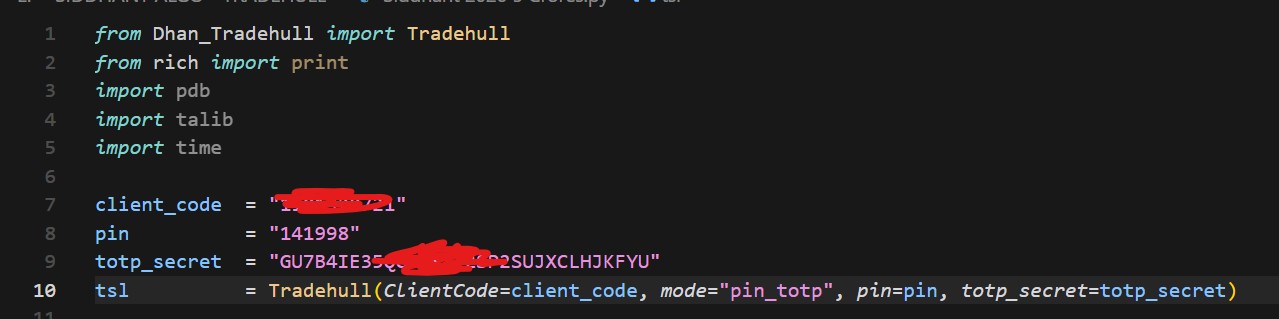
Getting error
PS C:\Users\Admin> & C:/Users/Admin/AppData/Local/Programs/Python/Python312/python.exe "e:/SIDDHANT ALGO - TRADEHULL/Session 1/Session 1/session1.py" Codebase Version 3 Traceback (most recent call last): File "e:\SIDDHANT ALGO - TRADEHULL\Session 1\Session 1\session1.py", line 13, in <module> tsl = Tradehull(ClientCode=client_code,mode="pin_totp", pin=pin, totp_secret=totp_secret) ^^^^^^^^^^^^^^^^^^^^^^^^^^^^^^^^^^^^^^^^^^^^^^^^^^^^^^^^^^^^^^^^^^^^^^^^^^^^^^^^^^^ TypeError: Tradehull.__init__() got an unexpected keyword argument 'mode' PS C:\Users\Admin>
Hi @aisiddhant ,
Check which version of the Dhan Tradehull codebase you are using and make sure it’s the latest one.
pip install --pre dhanhq
pip install Dhan-Tradehull==3.2.1
Confirm the installation by running the below commands-
pip show dhanhq
pip show Dhan-Tradehull
Refer here for more detailed documentation :
1 Like
Did all things as mentioned but still same error - Please help
Hi @aisiddhant ,
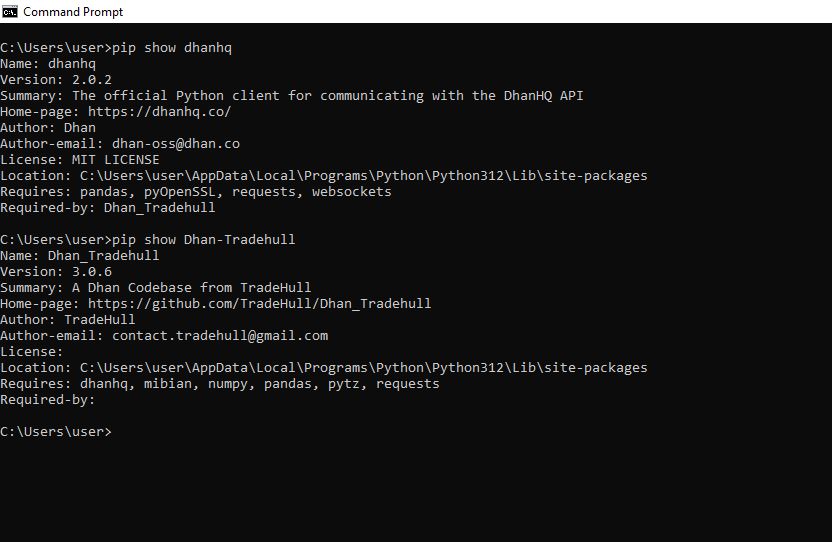
Share the screenshots by running the below commands in the cmd
pip show dhanhq
pip show Dhan-Tradehull
1 Like
Please find attaced image for your reference
Hi @aisiddhant ,
It seems you have been using older versions of Dhan_TradeHull codebase . Install the new versions by running the below commands -
pip install --pre dhanhq
pip install Dhan-Tradehull==3.2.1
Confirm the installation by running the below commands-
pip show dhanhq
pip show Dhan-Tradehull
1 Like
Thank you this is Fixed now
1 Like